

Connectivity#
delaynet provides a variety of connectivity measures to analyze the relationships
between time series.
These measures can be used to detect causal relationships, correlations, and
synchronisation between different time series.
To measure a significant correlation between two time series, each connectivity approach calculates a \(p\)-value. This \(p\)-value indicates the probability that the observed correlation between two time series is due to random chance. A strong correlation results in a low \(p\)-value.
One assumption is that the information propagation in the network can have varying delays between each node in the network. Due to this, the connectivity needs to be calculated for different delay steps. It is possible to either test for all delays up to a certain maximum delay or to test for specific delays. The best delay value and it’s corresponding \(p\)-value are returned.
To visualise this, we generate synthetic time series data using a delayed causal network (DCN) model. The data consists of eight interconnected nodes with 1000 time points each, where causal relationships exist between different time series with varying delays. We extract two specific time series from this network and apply Granger causality to find the optimal lag that produces the strongest causal relationship. The algorithm tests all possible lags from 1 to 50 time steps and identifies the lag that yields the minimum p-value, indicating the most significant causal connection.
Best lag: 7
Best p-value: 0.07471915278792031
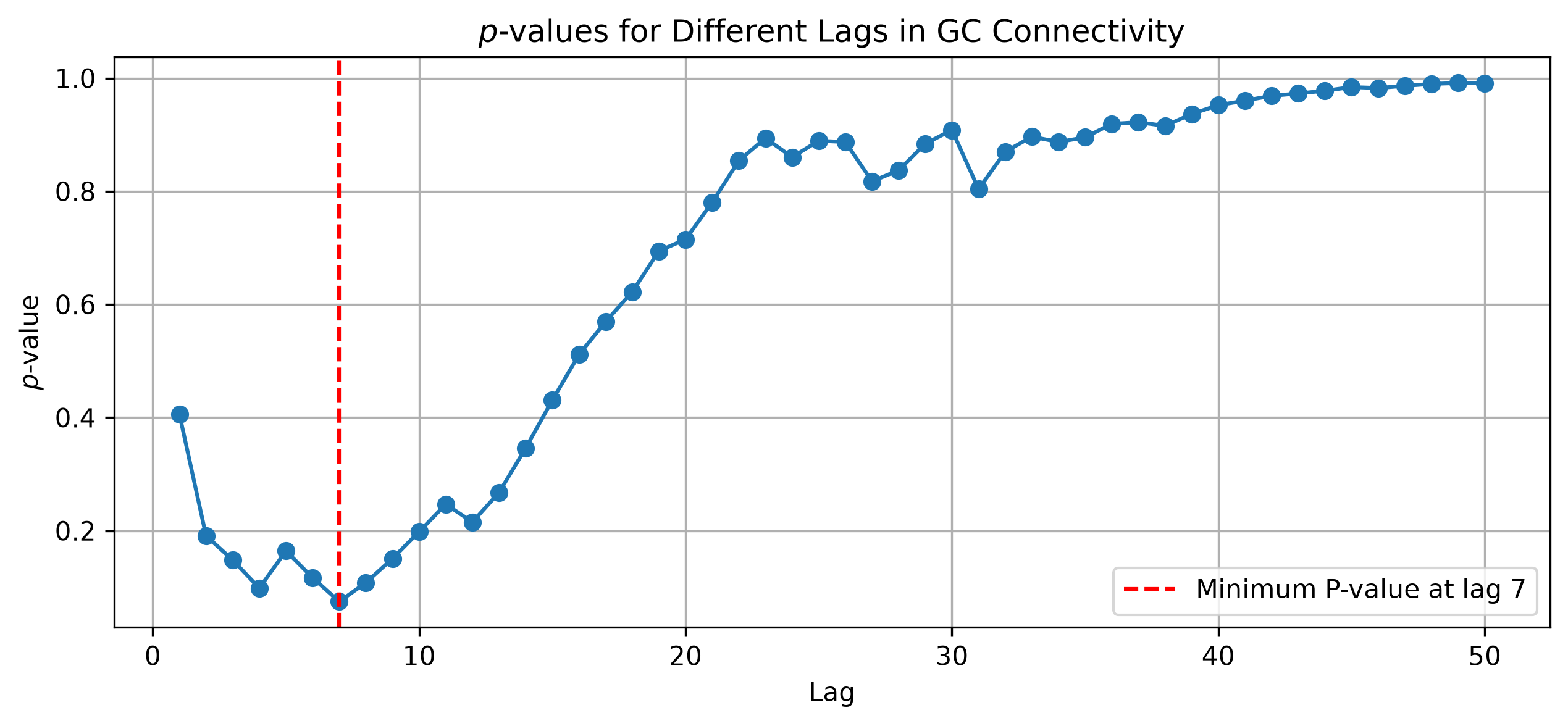
How the best lag is determined using p-values: The plot shows p-values calculated for each lag, with the minimum occurring around lag 7, after which the p-values increase. The algorithm selects this minimum as the best lag.
In one line:
dn.connectivity(ts1, ts2, "gc", lag_steps=max_lag)
(np.float64(0.07471915278792031), 7)
Using Connectivity Measures#
delaynet provides a unified interface for all connectivity measures through
the connectivity() function.
A diverse set of connectivity metrics to analyze relationships between time series data
are available. Each metric offers different approaches to detecting connections, from
simple correlations to complex causality measures. You can refer to each method by its
full name or by its shorthand:
Granger Causality: Statistical concept of causality based on prediction
gc,granger causality, orgt_multi_lag
Transfer Entropy: Measures the amount of directed transfer of information between two random processes
te,transfer entropy, ortransfer_entropy
Mutual Information: Measures the amount of information obtained about one random variable through observing another
mi,mutual information, ormutual_information
Linear Correlation: Calculates the Pearson correlation coefficient between two time series
lc,linear correlation, orlinear_correlation
Rank Correlation: Calculates the Spearman rank correlation between two time series
rc,rank correlation, orrank_correlation
Continuous Ordinal Patterns: Analyzes patterns in time series data to detect relationships
cop,continuous ordinal patterns, orrandom_patterns
Gravity: A toy metric for educational purposes
gv, orgravity
import delaynet as dn

# Calculate connectivity between two time series
result = dn.connectivity(ts1, ts2, metric="linear_correlation", lag_steps=5)
# tests all 1, ...., 5 lags
result = dn.connectivity(ts1, ts2, metric="lc", lag_steps=[1, 2, 5, 10])
# tests only specified lags using shorthand
Now, result is a tuple of the best \(p\)-value and the corresponding delay step.
For example, if result is (0.05, 3), it means that the best \(p\)-value is 0.05
and it occurs with a lag of 3 time steps.
You can view all available connectivity measures using the
show_connectivity_metrics() function:
from delaynet.connectivity import show_connectivity_metrics

# Show all available connectivity measures
show_connectivity_metrics()
Analysing the same time series data from the earlier example, switching between connectivity metrics is really simple:
max_lag = 40
(dn.connectivity(ts1, ts2, "gc", lag_steps=max_lag),
dn.connectivity(ts1, ts2, "mi", lag_steps=max_lag, approach="metric"),
dn.connectivity(ts1, ts2, "te", lag_steps=max_lag, approach="metric"),
dn.connectivity(ts1, ts2, "lc", lag_steps=max_lag),
dn.connectivity(ts1, ts2, "rc", lag_steps=max_lag),
dn.connectivity(ts1, ts2, "cop", lag_steps=max_lag),
dn.connectivity(ts1, ts2, "gv", lag_steps=max_lag))
((np.float64(0.07471915278792031), 7),
 (np.float64(0.0), 1),
 (np.float64(0.05), 5),
 (np.float64(0.058758562650754326), 31),
 (np.float64(0.012092430710742176), 31),
 (np.float64(0.01041645115679039), 7),
 (np.float64(0.0), 2))
For some connectivity measures the optimal lags agree with each other, but they generally vary, especially the p-values, as each of these approaches covers a different type of connectivity.
For details about these connectivity methods, see the next subsections.